Martius features

From Approved Film to Confirmed Delivery

Publish approved video versions to supported destinations and keep delivery records. Prepare advertising assets, marketing outputs and SCORM, xAPI or cmi5 learning delivery.

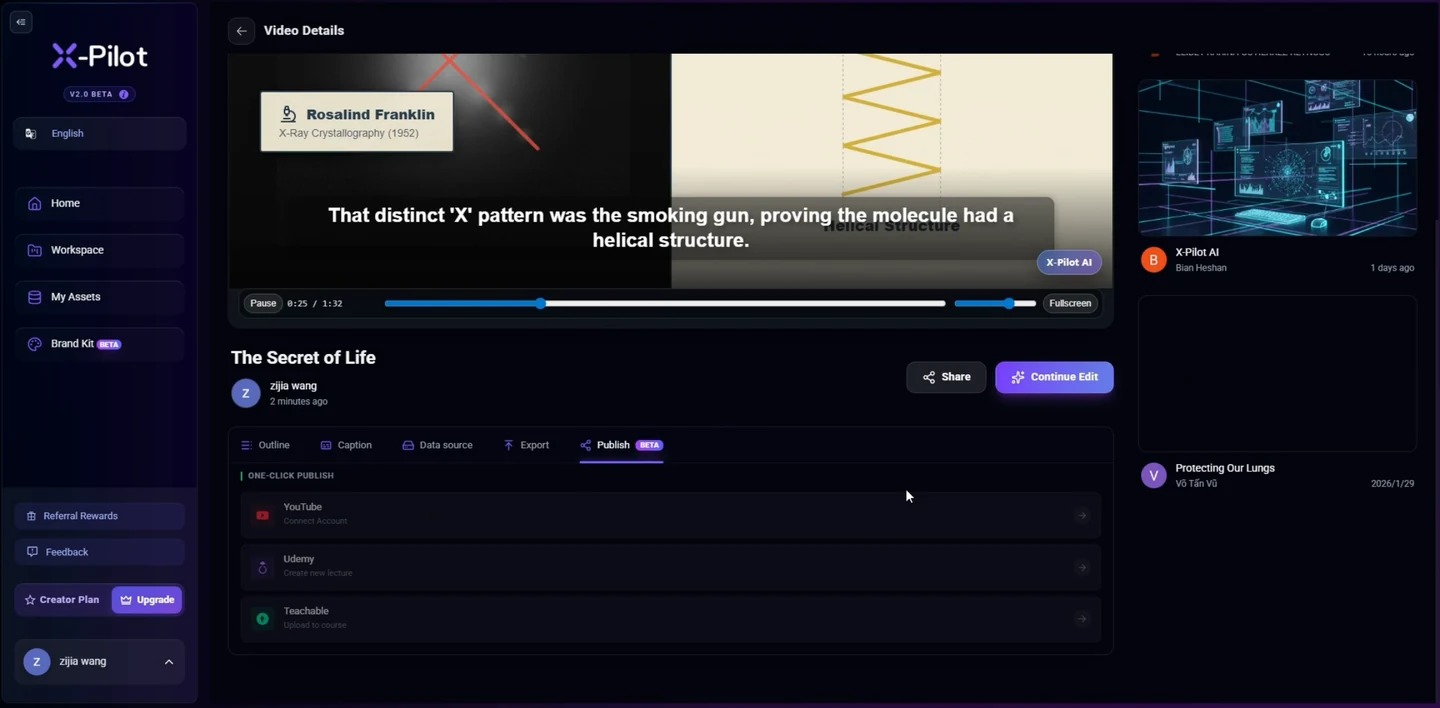
Actual X-Pilot web app recording

Choose where the reviewed version goes.

Destination selection is one step in publishing. The workflow below continues through approval, transfer and confirmation.

Select a publishing destination in a real projectVideos play silently when visible. Tap the film or press Space while it is focused to pause or resume. This recording has no sound.
Actual X-Pilot destination selection, from the Martius team’s existing web application. This clip shows selection only; it does not show an upload, a remote receipt or SCORM, xAPI or cmi5 delivery. About the team
  1. 0:01

    Open publishing

    The project opens its publishing destination list.

  2. 0:03

    Select the destination

    YouTube, Udemy and Teachable appear in the recorded X-Pilot interface.

Publish

A finished film.
A place to put it to work.

An ad placement. A product launch. A buyer conversation. A lesson inside an LMS. The destination shapes the delivery.

Read the delivery requirements
  1. Prepare

    Choose the destination and its delivery requirements.

  2. Review

    Approve the exact film, captions and accompanying message.

  3. Publish

    Confirm the selected output, account and action.

  4. Confirm

    Check the destination result and keep its publication record.

  5. Revise

    Bring affected published copies into the next review.

Ads

An approved creative, ready for its placement.

Explore this workflow

Ad asset libraries and reviewed campaign drafts

  • Placement-specific framing, duration, safe areas and caption treatment
  • Approved offer, eligibility, destination URL and tracking parameters
  • Selected account, market, usage rights and required disclosures
  • Separate asset delivery, ad-draft approval and campaign activation

The delivery record identifies the approved variant and its destination asset or draft. Uploading a video does not authorize campaign activation, targeting changes or spending.

Marketing

One launch, delivered to the places it belongs.

Explore this workflow

Connected channels, launch pages and campaign libraries

  • A reviewed version for each channel and placement
  • Title, description, cover, captions and a clear next step
  • Selected account, visibility, timing and timezone
  • Confirmed destination status and the project version used

Keep the launch film, channel versions and publication records connected. Use the scheduling or direct-posting actions supported by the selected destination; a local scheduled task and a native platform schedule have different execution requirements.

Sales

Put the right demonstration in the right conversation.

Explore this workflow

Selected hosting, sales pages and customer handoffs

  • The product and audience version approved for the conversation
  • A poster, captions, transcript and relevant call to action
  • Available destination access controls and a check for customer information
  • A record of the delivered version and its accountable owner

Deliver the reviewed product version with the materials a buyer needs. Private access, viewing analytics and CRM behavior depend on the selected service and are not implied by a video delivery.

Explainers

Give the explanation a useful home.

Explore this workflow

Product pages, help-content handoffs and selected video hosts

  • A clear question, reviewed sources and readable labels
  • Captions, a full transcript and a meaningful cover
  • Contextual page copy and a relevant next step
  • Version ownership and review of the processed destination result

Deliver the film and supporting page materials together. A searchable watch page still needs a crawlable host, visible context and matching metadata; publishing does not guarantee indexing or AI citation.

Education

Deliver a lesson as a learning activity.

Explore this workflow

LMS course packages or an authorized learning record store

  • A learning objective, reviewed lesson and learner-facing player
  • The supported SCORM version, xAPI/LRS activity or cmi5 profile for the target
  • Defined completion, resume and optional assessment behavior
  • Confirmed import, launch and learning records in the selected environment

Export SCORM courses, deliver xAPI-enabled activities to an authorized LRS, or use cmi5 for an LMS-launched activity. Course packaging, event recording and launch rules are distinct from the video file itself.

Training

Deliver the current procedure with its version record.

Explore this workflow

Training portals, LMS courses and approved internal delivery

  • Procedure owner, version, prerequisites and visible checkpoints
  • The selected supported SCORM, xAPI/LRS or cmi5 delivery profile
  • Completion and assessment rules approved for the task
  • A reviewed replacement plan and attributable learner records

Publish the approved procedure version and identify earlier delivered copies when it changes. Watching a video or completing an activity does not establish competence, certification or permission to perform a procedure.

Original materials and projects stay local. You approve the selected delivery copies, destination and action before anything is sent.

Connect creation, review and delivery

Martius carries a video from local source material through an editable first cut, review, export and approved destination delivery. Choose the purpose and destination in the brief so production has the right framing, message and delivery requirements.

An ad placement, a launch post, a buyer demonstration and an LMS lesson have different requirements. The shared publishing workflow keeps the selected output, account, action and confirmed result connected to the local project.

Approve exactly what leaves the device

Prepare the reviewed film, captions, cover and required destination information. Inspect the selected account, placement, visibility, timing and accompanying text before authorizing the action.

Original materials and editable projects remain local. Only the delivery copies and required metadata named in the approval are sent. Local export and remote publication remain separate choices.

  • Prepare the local delivery bundle
  • Review the version, files, account and destination
  • Authorize the selected supported action
  • Confirm the remote state and retain its record

Ad delivery preserves the campaign boundary

Keep each creative variant connected to its approved offer, eligibility, dates, call to action and landing page. Use the selected placement profile, then inspect the uploaded result after the destination processes it.

Asset upload, an ad draft, platform review and campaign activation are distinct actions. Approval of a creative does not authorize budget or targeting changes. The selected connector declares which operations it supports and which require a separate decision.

Learning delivery has its own runtime

Deliver education and training through SCORM course packaging, xAPI-enabled activities or cmi5 LMS launches. Select the supported target profile, define completion and resume behavior, and confirm that the delivered activity launches and records the expected events.

A course package includes more than the media file. Learning records describe the defined activity; they do not establish competence or certification. The authored educational studio films on this site are visual references, not functioning course packages.

Keep confirmation and revisions connected

The publication record identifies the approved project revision, selected files, destination, remote identifiers and confirmed state. Processing, awaiting platform review, scheduled and live results remain distinguishable where the destination exposes them.

When product or procedure information changes, inspect the affected destinations and approve a new delivery. Some platforms need a new upload or URL. An interrupted or uncertain action is reconciled before a retry, with failed work visible instead of hidden behind a completed state.
Questions, answered

A few things to know.

Can Martius publish videos to connected platforms?

Yes. Prepare the destination-specific output and accompanying material, review the selected account and action, then approve the delivery. Martius records the destination’s confirmed result. Upload, scheduling, post creation and replacement depend on the selected connector’s supported operations.

How does publishing fit with keeping files local?

Original documents, raw footage, recordings, portraits, source audio and editable projects remain on your device. Finished outputs stay local by default. Publishing sends only the selected delivery copies and necessary metadata to the destination you explicitly approve; it does not move your source library into a cloud workspace.

Does publishing an ad video start paid advertising?

No. Preparing a file, uploading an asset, creating an ad draft and activating a campaign are separate actions. Any supported operation that starts delivery or changes budget, targeting or spending needs its own explicit approval.

Is SCORM or xAPI another video file format?

No. SCORM packages learning content and provides communication with an LMS. xAPI defines learning-event data and communication with a learning record store, or LRS. Martius delivers through the selected supported learning profile; an MP4 alone does not implement course runtime or learning records.

Where does cmi5 fit?

cmi5 provides course structure, launch, authorization, session and reporting rules for using xAPI with an LMS. Select the supported cmi5 profile and target LMS/LRS together. Its Quartz specification refers to xAPI 1.0.3; a cmi5 label is not a claim of automatic compatibility with every xAPI version.

What happens when a published video needs an update?

The project links published outputs to their approved local revisions. Create and review the new version, inspect the affected destinations and approve the supported replacement or new upload. Some services need a new asset, post or URL; a local revision does not silently change every remote copy.

What if an upload is interrupted or its result is uncertain?

Keep the delivery state and inspect the destination before retrying. Martius distinguishes incomplete work, remote processing and confirmed delivery so an uncertain outcome can be reconciled rather than automatically creating a duplicate post.

Meet Martius

Your next product video starts here.

Bring one product, one message, and the assets you already have.