Update product videos without starting over. Review affected text, narration and scenes, retain approved creative and compare the revised version before delivery.
Here is a real request that changes an existing project. The interactive study below explains a different task: tracing an offer change through picture, narration and captions.
Videos play silently when visible. Tap the film or press Space while it is focused to pause or resume. This recording has no sound.
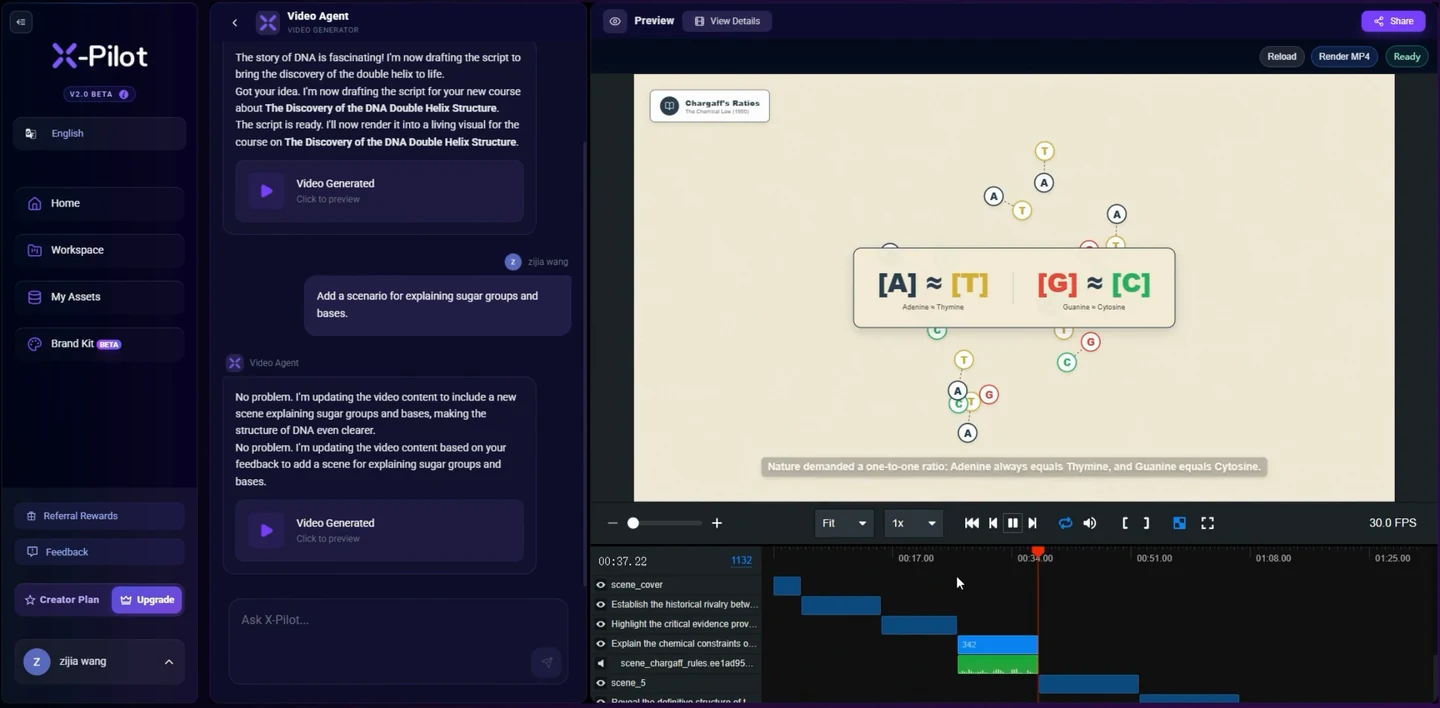
Recorded in X-Pilot, the web application built by the Martius team. This is real software source footage for a product video. The recording does not document a Martius desktop capture run. About the team ↗
0:01
The request
The user asks: “Add a scenario for explaining sugar groups and bases.” The existing DNA project remains visible.
0:08
The response
The application responds to the request inside the same project.
0:11
The result
The updated DNA explanation appears alongside the project preview and timeline.
02 / A connected next version
The offer changes. The good work carries on.
A revised price or feature name can touch the picture, narration and captions. Martius traces those connections and keeps the creative you approved.
Review what changes. See what stays. Then compare the next version.
“Change $39 to $29. End the offer on November 30. Keep the approved creative.”
Source change
Offer frame / scene 03
$39$29
Voiceover script
Thirty-nine dollars.Twenty-nine dollars.
Caption + end card / scene 05
Offer ends October 31.Offer ends November 30.
What this study retains
Product sourceQuiet editorial treatmentOpening + pace
An authored before-and-after example. Review the affected content alongside the product source and the creative choices being retained.
A useful video has a life after its first delivery
An offer expires, a product feature changes or a procedure gains a new step. Martius keeps the editable project, source references and approved parent so the change can begin from the work you already reviewed.
Supply the changed information and its scope. The Agent identifies related content, produces an impact summary and creates a new revision. You compare the affected text, voice, captions and scenes before approving it.
Make the replacement and preservation clear
For a price change, give the previous price, new approved price, applicable market and dates. For a software update, include the current recording and feature wording. Relative instructions such as “end of the month” need an actual date and timezone.
Name the content you want to retain using the approved parent: a product reveal, an opening sequence or a presenter passage. Review conflicting instructions before production rather than losing the context in a fresh prompt.
Old value, approved replacement and scope
Source revision and applicable date or market
Affected scenes, narration, captions and variants
Approved parent and explicit preservation decisions
Check the impact in the actual next version
A longer line can alter a voice passage, caption timing or adjacent shot. Martius makes the affected scope visible so you can inspect the new film and any unexpected differences around the revised section.
Retain review decisions with the revision and reopen content that depends on a changed source. A production completion message is not a substitute for watching the exported file and verifying its information.
Create the revised local delivery and inspect each channel or language version. Publication records identify the approved output used by each destination, giving you a list of copies to consider when the information changes.
Approve each supported replacement or new upload. Some destinations require a new asset or URL; retaining a publication record does not imply universal in-place replacement or autonomous monitoring of a campaign.
These authored studio films offer specific story and visual references. Each link below explains its relationship to this feature.
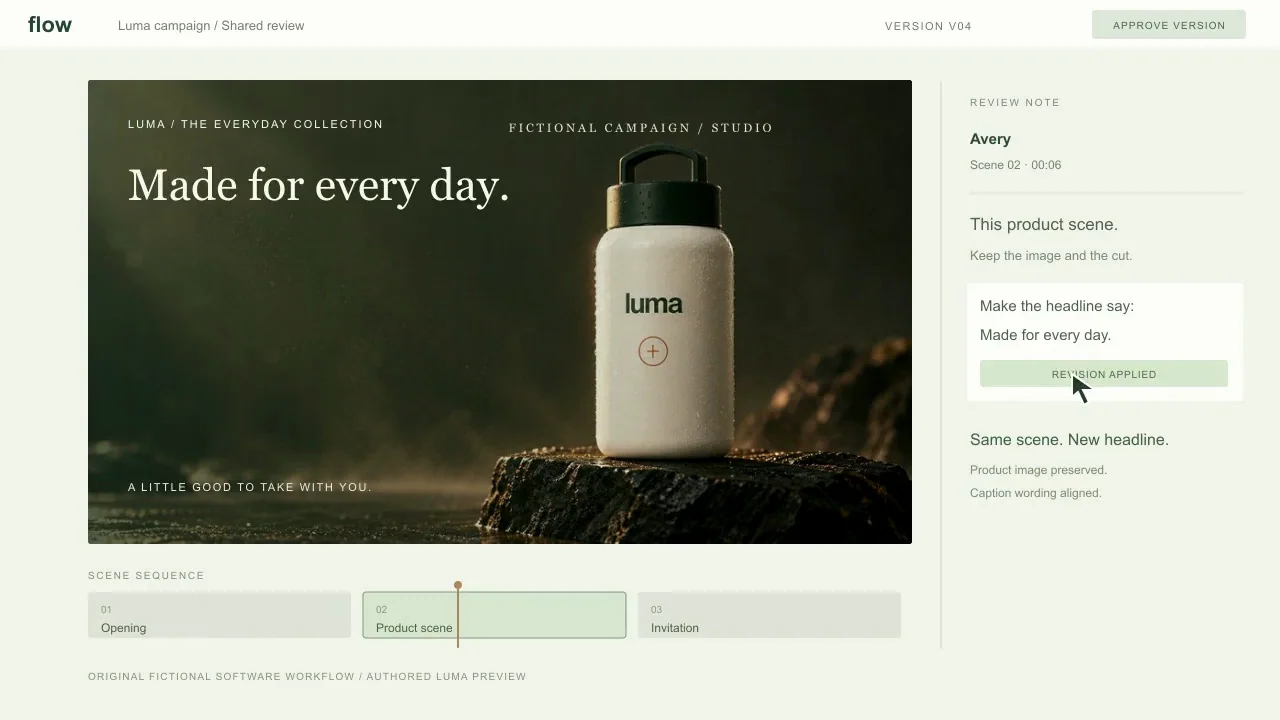
Authored interface illustration: the same product preview receives a visible headline change. It helps explain revision storytelling; the controls belong to fictional Flow software.
Videos play silently when visible. Tap the film or press Space while it is focused to pause or resume. Sound starts only when you enable it.
A software walkthrough concept follows a scene selection, one headline revision, and an approved handoff inside an original moving review interface.
Martius studio · Authored showcase
Questions, answered
A few things to know.
Can Martius update an existing video project?
Yes. Supply the changed information, its approved source and the content to retain. Martius creates an impact summary and revision across related text, narration, captions and scenes, with comparison to the approved parent.
What needs checking when an offer changes?
Check every visible and spoken mention, captions, qualifications, closing invitation and destination. Verify price, eligibility, dates and market, then inspect all affected channel and language versions.
Will every unrequested detail stay identical?
Use explicit preservation decisions and compare the actual versions. Some wording changes affect timing, transitions or layout; the review workflow makes those effects inspectable rather than promising that every pixel is unchanged.
Will Martius notice external business changes automatically?
The update workflow starts with a change supplied by your team. Source and publication records help manage that revision; they do not imply autonomous monitoring of external prices, procedures or product releases.
Can the published version be replaced?
Use the operation supported by the destination. Some services allow an update; others need a new upload, post or URL. Martius keeps the approval and confirmed destination state linked to the new project revision.