Martius features

Prepare the Film for Its Destination

Export reviewed videos, channel versions and accompanying files from your local Martius project. Keep the source revision, delivery settings and output record together.

Actual X-Pilot web app recording

A delivery includes more than the film.

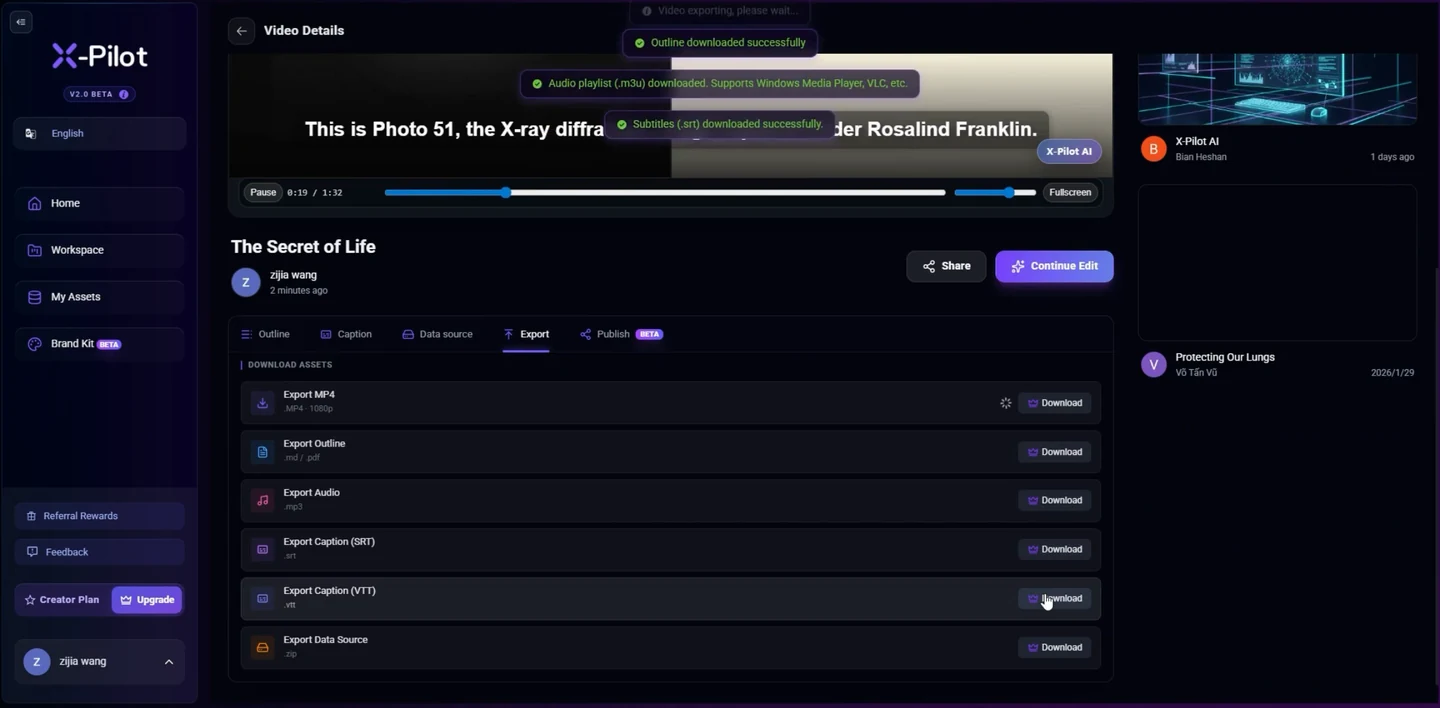
Inspect the export view and its supporting-file options. Open the finished media bundle below to see a video, cover and source record.

Inspect the export options in a real video projectVideos play silently when visible. Tap the film or press Space while it is focused to pause or resume. This recording has no sound.
Actual X-Pilot export interface. This short recording shows the available selections. The inspectable website media bundle below provides an example of finished files. About the team
  1. 0:02

    The project material

    The source recording shows the project video before opening the export controls.

  2. 0:03

    Choose the supporting files

    The visible export list includes MP4, outline, audio, SRT, VTT and data source options.

Inspectable website media bundle

Open the files that accompany the recording.

This real website bundle contains the source-recording rendition, its cover and a measured source record. It illustrates a media handoff; editable Martius backups and learning packages have their own formats.

A delivery is a usable set of files

Martius exports the approved film and its supporting materials to your device. Choose the supported video profile and the required captions, poster or cover, transcript, language label and delivery manifest for the task.

The delivery record connects the actual files, export settings and checksums to a project revision. Check the finished bytes rather than approving only a preview or a production completion message.

  • Finished video in a supported output profile
  • Reviewed caption file and optional captioned rendition
  • Cover or poster and full transcript
  • Language, version and delivery-file manifest

Review landscape, portrait and square versions

Create 16:9, 9:16 and 1:1 versions with their own framing and review. Reposition the product, presenter, offer and captions for the destination instead of treating every output as a crop of the same composition.

Choose the available dimensions, frame rate, audio and quality profile in the product. The website’s studio files do not establish support for every professional codec, arbitrary resolution or unlimited duration.

Keep video export and editable backup separate

A finished MP4 is a playback file. An editable project backup retains the project structure, source references, versions and included assets according to the selected backup scope; it serves a different purpose.

Inspect what a backup includes and which sources or external dependencies must be available to restore it. A missing or moved resource needs reconnection; project backup does not imply interchange compatibility with every professional video editor.

Make failures and partial deliveries visible

The export workflow records production stages, completed outputs and failed variants. If a source is missing, a render fails or storage is insufficient, the project retains its revision and identifies the work to recover or rerun.

A batch with one failed language or channel version remains partially complete. Keep successful files, repair the specific problem and review the recovered output before including it in the delivery.

Choose local handoff or an approved publication

Exporting keeps the delivery local. Publish is a separate action that sends the selected output and required information to a named destination after approval and records the remote result.

For learning delivery, use the course or activity workflow rather than renaming a video file. SCORM needs course packaging and LMS runtime behavior; xAPI needs defined events and an authorized LRS; cmi5 adds LMS launch and course rules.

Questions, answered

A few things to know.

What can I export from a Martius video project?

Export the reviewed video in a supported profile with the supporting caption files, cover or poster, transcript, language information and delivery manifest selected for the task. Keep the export tied to its approved project revision.

Can I export portrait, landscape and square videos?

Yes. Create 9:16, 16:9 and 1:1 versions within the supported output profiles and review each composition, product view, offer and caption safe area before delivery.

Is a video file an editable project?

No. A video is a finished playback file. Use a project backup to retain editable structure, revisions and the included assets or source references; inspect its dependency and restore scope separately.

Does local export upload my sources?

No. Local export writes the selected delivery to your device. Publishing is a separate approved action for selected output copies and required metadata; original source materials and the editable project remain local.

What happens if one batch export fails?

The project shows the completed and failed outputs separately, preserves successful work and records the stage to recover. Fix the specific issue, rerun the affected work and review the resulting file before marking the delivery complete.

Is SCORM just a video export option?

A SCORM delivery includes a course player, manifest, resources and LMS communication. xAPI and cmi5 have different event and launch requirements. Use the selected learning-delivery workflow rather than treating them as video codecs.

Meet Martius

Your next product video starts here.

Bring one product, one message, and the assets you already have.