Martius features

Review the Film Before You Deliver It

Review product facts, picture, narration, captions and version changes together. Refine the affected scenes and approve the exact video before export or publication.

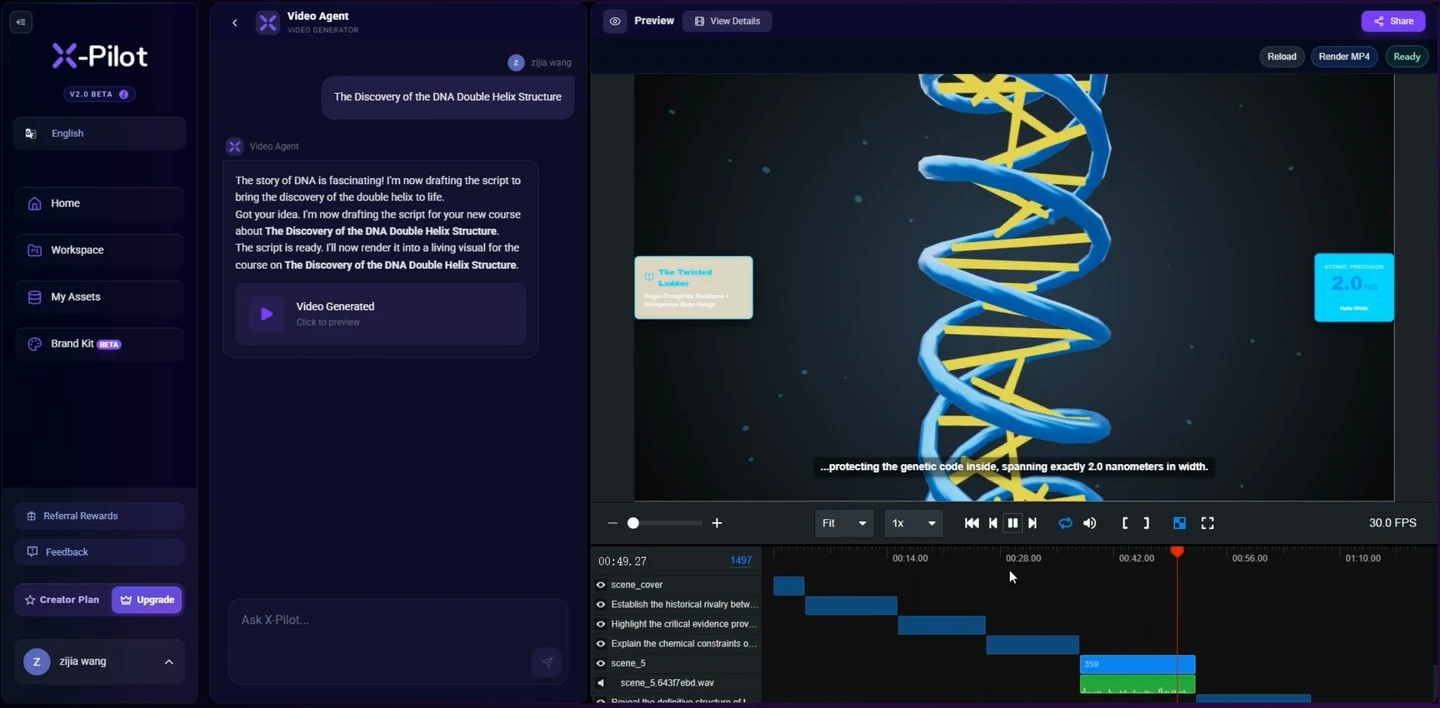
Actual X-Pilot web app recording

Review the picture in the working project.

Start with the actual preview and timeline. Then inspect the facts, narration, captions and delivery files that belong to the reviewed revision.

Preview a real project alongside its timelineVideos play silently when visible. Tap the film or press Space while it is focused to pause or resume. This recording has no sound.
Recorded X-Pilot preview footage from the same team. It shows the preview and timeline; formal Martius approval and revision records are described separately below. About the team
  1. 0:01

    The working project

    The X-Pilot project interface shows a video preview beside its editable timeline.

  2. 0:03

    Inspect the picture

    Successive visual scenes can be inspected within the same project.

Approval is more than a completed render

Martius connects source information, the finished film and open questions in one production review. Inspect what the output actually communicates before you approve a delivery or publishing action.

A rendered video can still contain an old price, a mispronounced product name, unreadable text or an obscured control. Review status distinguishes checked content, unresolved questions, failed production work and material awaiting a person’s decision.

Check facts where the viewer encounters them

Compare approved sources with names, prices, specifications, dates and claims in the visuals, narration and captions. Check the relevant product version and scope, not simply whether the wording appeared in the brief.

Inspect qualifications, timing and visual implications as well as text. A source may be incomplete or outdated; product and subject-matter reviewers remain responsible for the meaning.

  • Source facts, product revision and applicable scope
  • Visible text, real product details and readable timing
  • Narration, pronunciation, captions and presenter synchronization
  • Unresolved questions and named review decisions

Review media quality and each delivery version

Watch the complete film for framing, transitions, visual clarity, sound intelligibility and the closing invitation. Review caption safe areas, presenter placement and the technical properties of the exported file against the selected destination profile.

Channel and supported language versions need their own review. A platform may crop or transcode a delivery, so inspect the confirmed destination result after publishing as well as the local file.

Correct the part that needs attention

Locate an issue by scene, passage, fact or resource, keep the approved parent and rerun the affected production work. Compare the resulting version and reopen any decision whose source changed.

Production stages and failures stay visible. Stop a task, preserve completed work and recover from the relevant stage or retry the specific failed work; a partial export or failed variant is not reported as a completed delivery.

Keep the decision connected to the delivered file

Approval identifies the object, revision, scope and decision. Export records and publication history refer to that reviewed version, so later changes can be traced back to the material the reviewer saw.

Production review supports inspection and recovery. It is not a certification, a guarantee that every fact is correct or an automated service for improving advertising returns.
Creative result references

Put the workflow in a creative context.

These authored studio films offer specific story and visual references. Each link below explains its relationship to this feature.

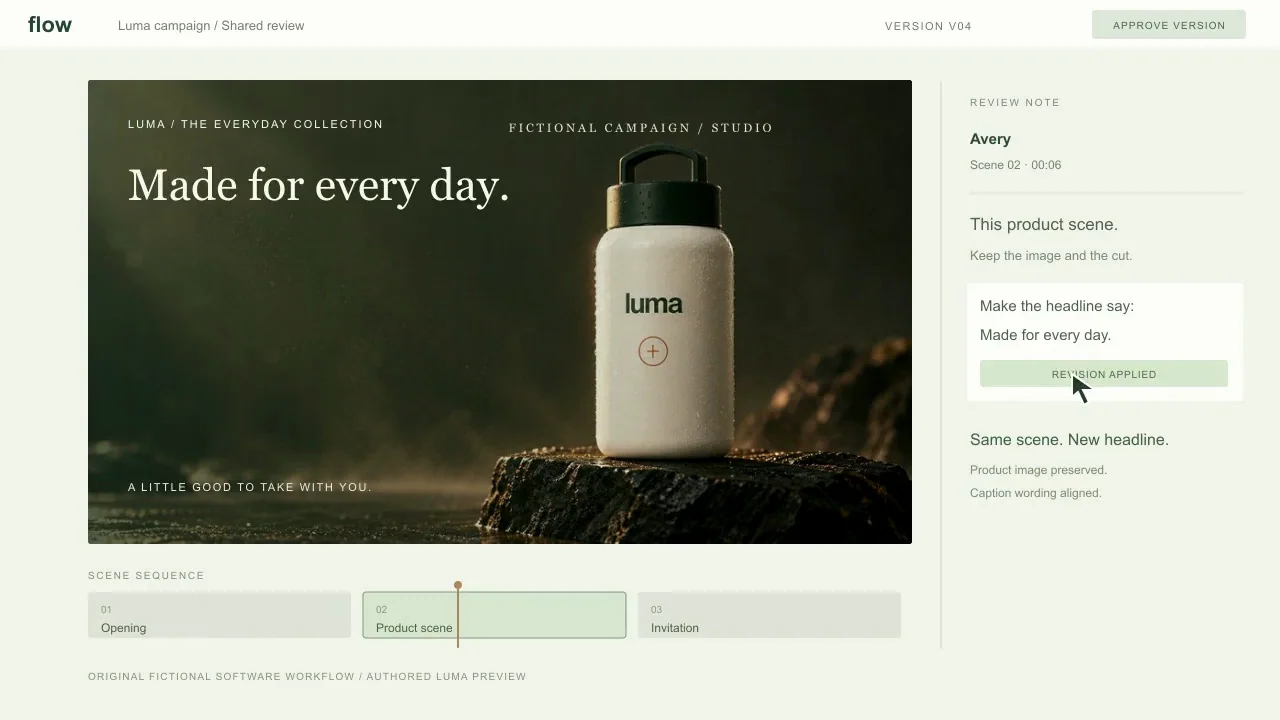
Authored review-story illustration: a specific headline revision stays attached to a selected scene and a named handoff. It is a fictional interface concept.

One film. One clear revision.Videos play silently when visible. Tap the film or press Space while it is focused to pause or resume. Sound starts only when you enable it.
24 secondsThe brief

Sales

One film. One clear revision.

A software walkthrough concept follows a scene selection, one headline revision, and an approved handoff inside an original moving review interface.

Martius studio · Authored showcase

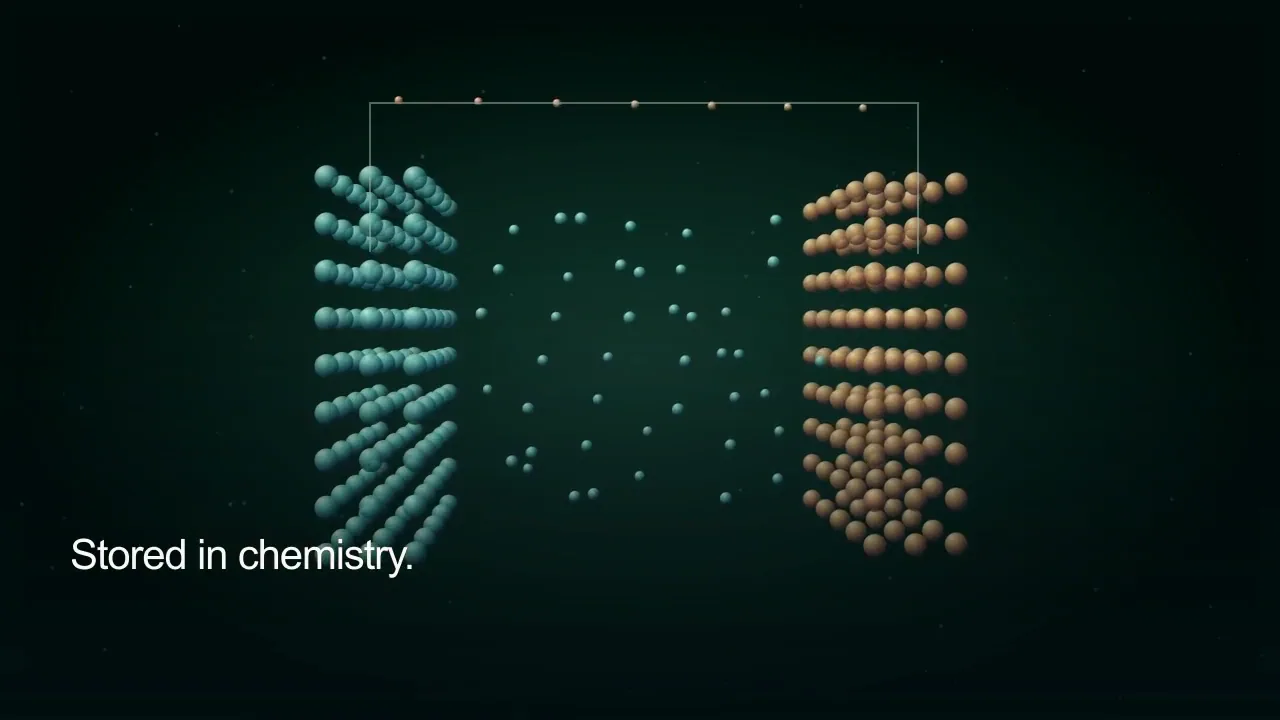
Subject review reference: inspect the illustrated internal ion path and external circuit separately. A subject specialist reviews the explanation; this film does not demonstrate a review approval operation.

Charge. Two journeys.Videos play silently when visible. Tap the film or press Space while it is focused to pause or resume. Sound starts only when you enable it.
24sThe brief

Education

Charge. Two journeys.

An immersive lithium-ion battery education film separating the internal ion route from the external electron route.

Martius studio · Authored showcase

Questions, answered

A few things to know.

What does Martius production review cover?

Review approved source facts, their visual and spoken appearances, captions, presenter passages, media quality, delivery-file properties and revision differences. Keep unresolved questions visible until the responsible reviewer decides.

Can I rerun only a section that needs correction?

Yes. Identify the affected scene, passage, fact or resource and repeat the relevant work from the retained project state. Compare the new output with its parent and review the changed result before approval.

What happens when a render or export fails?

The project records the failed stage and preserves completed work. Recover from the appropriate stage or retry the failed task; partial success remains distinguishable from a fully delivered project.

Does review guarantee factual correctness?

No. Review makes sources, changes and questions inspectable, but a source can be outdated and a visual can imply an unsupported claim. The product owner or qualified subject specialist still approves the meaning.

Does production review optimize ad performance?

Production review concerns accuracy, presentation, media quality and delivery suitability. Campaign performance, attribution and advertising optimization are separate activities and no ROAS improvement is guaranteed.

Meet Martius

Your next product video starts here.

Bring one product, one message, and the assets you already have.